How to Run Gemma4-12B-Coder Locally: A 12B Coding Model That Fits in 4.5 GB
Most people assume a useful coding model needs a 24 GB GPU and a fat electricity bill. Then something like yuxinlu1/gemma-4-12B-coder-fable5-composer2.5-v1-GGUF shows up — a 12-billion-parameter model distilled from real, execution-verified chain-of-thought, with a 256K context window, and a 2-bit quant that fits in 4.5 GB. You can run the whole thing on a cheap laptop with integrated graphics, fully offline, no API key, no cloud.
This is a hands-on guide to actually running it: which quant to grab, how to launch it with llama.cpp or Ollama, how to turn on its thinking mode, and the few gotchas worth knowing before you point an agent at it.
What this model actually is
Under the verbose name is a focused fine-tune of google/gemma-4-12B-it on verifiable Python coding data. "Verifiable" is doing real work here — every training example is an algorithmic or function-level problem that ships with deterministic tests. The reasoning has to produce code that actually passes.
The interesting part is the training data. It's a distillation from two complementary teachers:
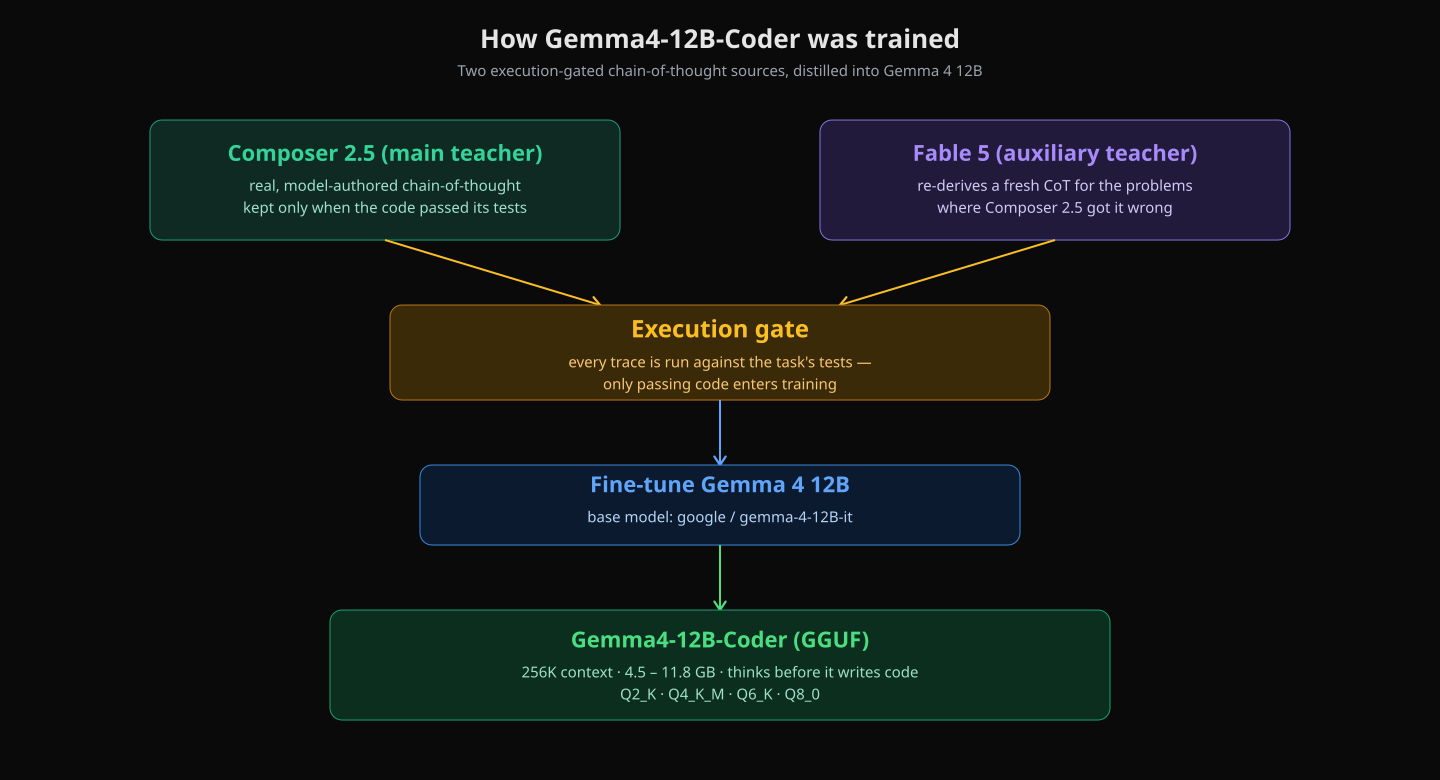
Two execution-gated chain-of-thought sources, distilled into Gemma 4 12B. Only traces whose code passed the task's tests enter training.
- Composer 2.5 (main teacher). Genuine, model-authored reasoning traces. The teacher solved each problem, its code was run against the tests, and only the passing solutions were kept. This is the bulk of the signal.
- Fable 5 (auxiliary teacher). For the problems where Composer 2.5 got it wrong, Fable 5 was handed the same task to re-derive a fresh, self-consistent chain-of-thought and a correct solution — again gated on passing the tests. This recovers the hard cases the main teacher missed.
The result reasons in the open — it walks through edge cases, complexity, and approach before emitting a clean, runnable solution. The recipe is the part worth stealing: real chain-of-thought for solid coverage, plus synthetic "second-attempt" chain-of-thought to patch the failures, both verified by execution before anything touched training.
The whole point is that the reasoning you're learning from leads to code that works. That's a meaningfully stronger guarantee than "the model was trained on a lot of code."
One footnote on the model's status: the author's v2 update notes that Fable 5 access was pulled shortly after this release, and that v2 will lean more heavily on Composer 2.5 as a backbone (with GLM-5.2 under consideration as an additional teacher). So v1 — this model — is currently the one to grab.
The 256K context fix
When the model first shipped, it reported only a 131K context window. That turned out to be the well-known upstream Gemma 4 metadata bug — Google's initial config.json shipped max_position_embeddings: 131072 instead of the real 262144, and that value got baked into downstream finetunes and quants before it was fixed upstream.
The weights were always fine — it was purely a metadata field. All the GGUF quants have since been re-patched to the full 256K context (gemma4.context_length = 262144). If you grabbed an early copy, just re-download.
Step 1 — pick a quant that fits your memory
The model ships in four GGUF quants. The decision is almost entirely a function of how much VRAM (or, on Apple Silicon, unified memory) you can spare. Here's the cheat-sheet, assuming a q8_0 KV cache and ~1.5 GB of overhead:
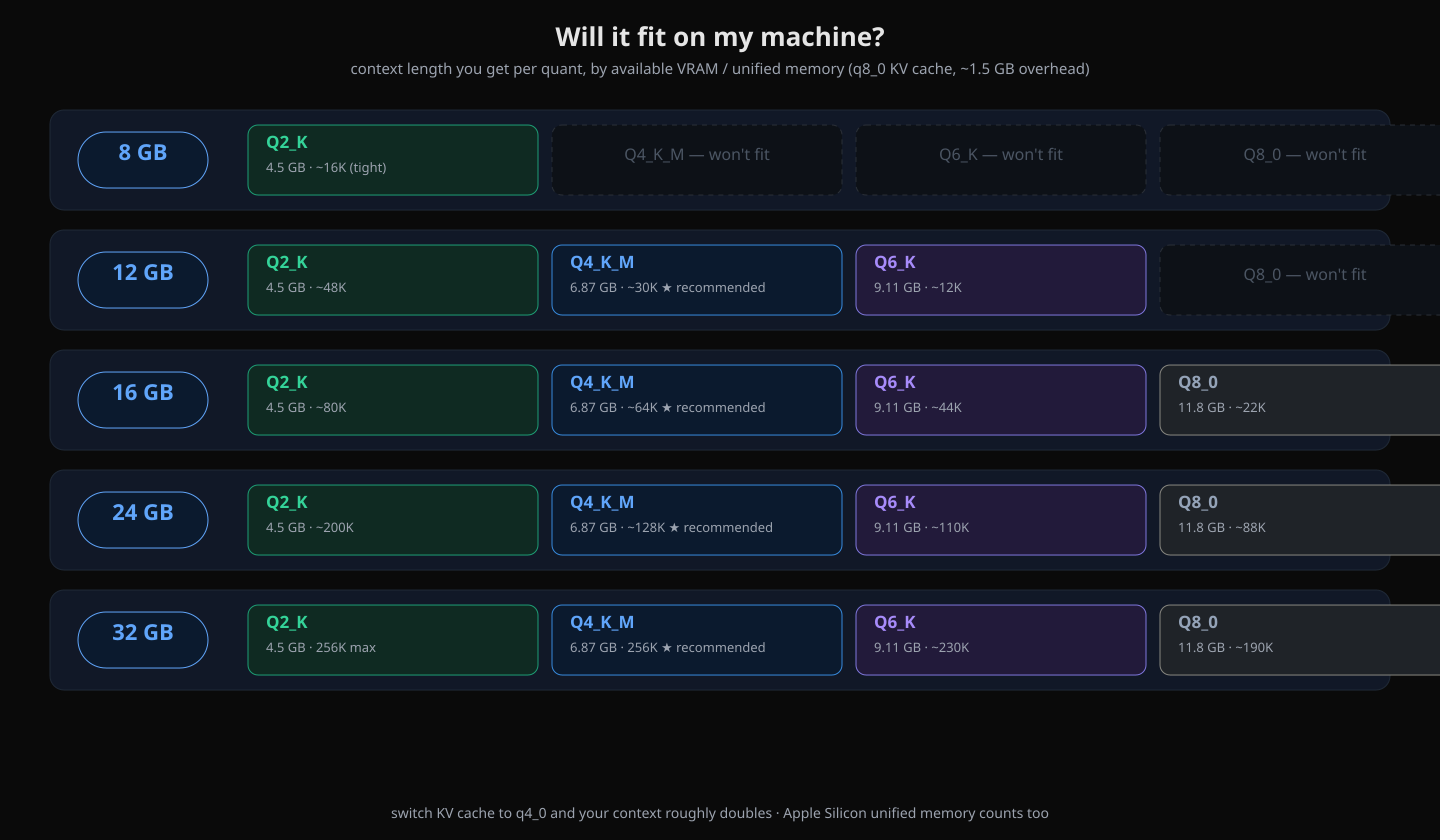
Which quant and how much context you get per memory tier. Q4_K_M is the sweet spot for most machines.
In practice:
- Q2_K · 4.5 GB The tiniest. Runs almost anywhere, including 8 GB machines — though context is tight (~16K, and you may need to drop it further).
- Q4_K_M · 6.87 GB The sweet spot. Recommended for most people. On a 16 GB machine you get ~64K of context, which is plenty for serious coding sessions.
- Q6_K · 9.11 GB Near-lossless. Grab this if you have 16–24 GB and want maximum quality.
- Q8_0 · 11.8 GB Basically full quality. Needs 24 GB+ to be comfortable.
Low on room? Two levers: drop a quant size, or switch the KV cache to
q4_0. The latter roughly doubles your usable context at a small quality cost.
Step 2 — launch it
The same GGUF runs in every common local runtime. Pick whichever you already have installed.
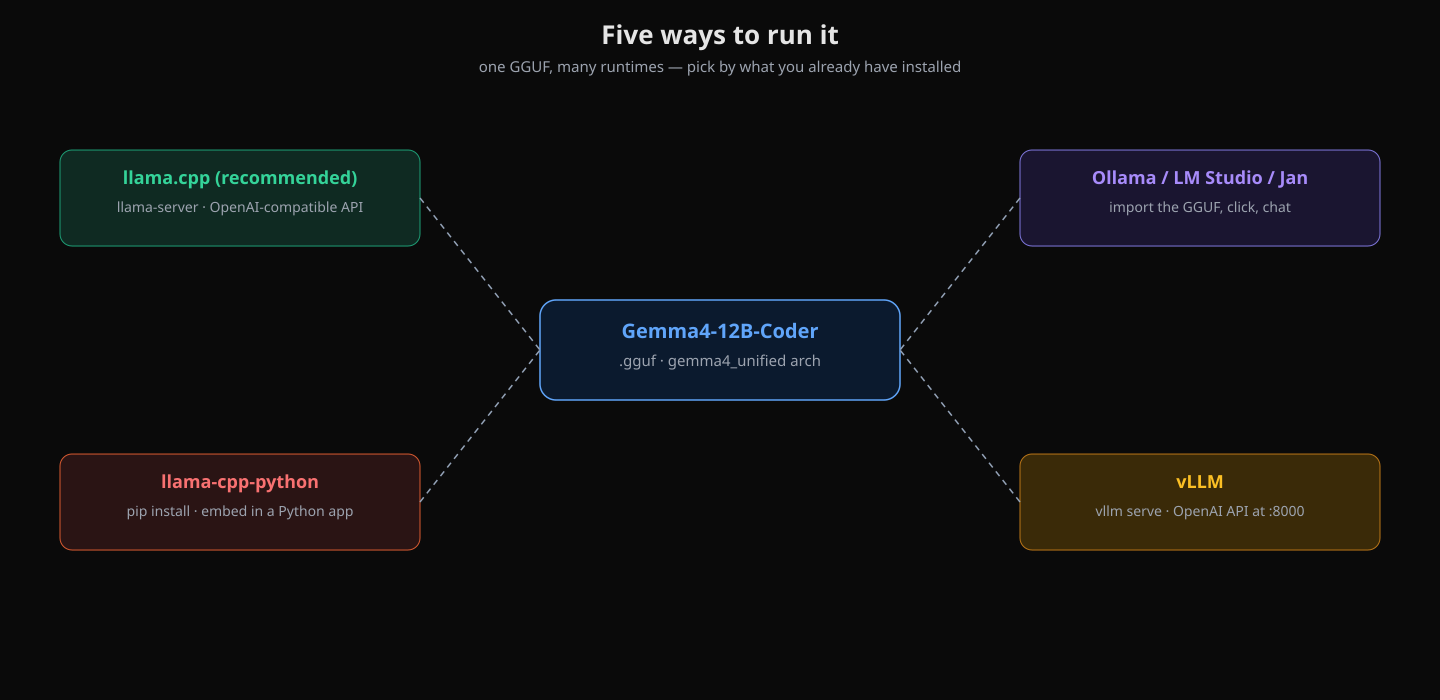
One GGUF, many runtimes. llama.cpp gives you the most control; the one-click apps get you chatting fastest.
Option A — llama.cpp (recommended)
llama.cpp gives you the most control and the best performance. Important: this is the gemma4_unified architecture, so you need a recent build of llama.cpp — older builds will refuse to load it. Install via Homebrew, WinGet, or build from source.
The easiest path is to let llama-server fetch the quant straight from Hugging Face using the -hf shorthand:
# Install (pick one):
#   brew install llama.cpp        # macOS
#   winget install llama.cpp      # Windows
#   or build from source: https://github.com/ggml-org/llama.cpp

# Start an OpenAI-compatible server with a web UI:
llama-server \
  -hf yuxinlu1/gemma-4-12B-coder-fable5-composer2.5-v1-GGUF:Q4_K_M \
  --ctx-size 16384 \
  --n-gpu-layers 99 \
  -fa \
  --cache-type-k q8_0 --cache-type-v q8_0 \
  --temp 1.0 --top-p 0.95 --top-k 64 \
  --host 0.0.0.0 --port 18080
Open http://localhost:18080 and you're chatting. Bump --ctx-size per the cheat-sheet above; add --no-mmap on Windows if you want the model pinned in RAM. Prefer offline inference in the terminal instead? Swap llama-server for llama-cli with the same flags.
Option B — Ollama (one-liner)
If you already run Ollama, it can pull GGUFs directly from Hugging Face. This is the fastest path to a working chat:
ollama run hf.co/yuxinlu1/gemma-4-12B-coder-fable5-composer2.5-v1-GGUF:Q4_K_MThat downloads the Q4_K_M quant on first run and drops you into an interactive prompt. Ollama also exposes an OpenAI-compatible endpoint at http://localhost:11434/v1 if you want to point other tools at it.
Option C — LM Studio / Jan (GUI)
Prefer a desktop app? Both LM Studio and Jan can import any GGUF. Search the model ID, pick your quant, click, and chat. No command line required — good for a first taste or for non-developers on your machine.
Option D — llama-cpp-python (embed it)
If you want the model inside a Python app, llama-cpp-python wraps the same engine:
# pip install llama-cpp-python

from llama_cpp import Llama

llm = Llama.from_pretrained(
    repo_id="yuxinlu1/gemma-4-12B-coder-fable5-composer2.5-v1-GGUF",
    filename="gemma4-coding-Q4_K_M.gguf",
)

response = llm.create_chat_completion(
    messages=[{"role": "user", "content": "Write a Python function to detect a cycle in a linked list."}]
)
print(response["choices"][0]["message"]["content"])
Note the filename pattern — the actual GGUF files in this repo are named gemma4-coding-<quant>.gguf, so match that when you specify filename.
Step 3 — use thinking mode (it's how the model was trained)
This is the part most people get wrong. The model thinks in Gemma's native thought channel before answering — that's exactly how it was trained, on those Composer 2.5 / Fable 5 reasoning traces. If your runtime defaults thinking off, you're throwing away the entire point of the fine-tune.
Keep enable_thinking=true (the default Gemma chat template handles it). The recommended sampling, straight from the model card:
- General:
temp 1.0,top_p 0.95,top_k 64 - For deterministic coding: go greedy —
temp 0— for more reproducible solutions
What you'll see is the model lay out its reasoning first (edge cases, the approach, the complexity), then produce the solution. The thinking tokens are part of the output stream, so if you're parsing the response programmatically, account for the thought channel.
Gotchas before you put it in production
- It is not safety-aligned. The training data is task-focused with no safety hedging, so this model refuses far less than base Gemma. That's a feature for a coding tool and a liability for a public-facing one. Add your own guardrails — input/output filters, an allowlist of tasks, rate limiting — before exposing it to end users.
- It's specialized for Python / algorithmic coding. Reasoning quality is strongest in that domain. For general knowledge, facts, and numbers, double-check the output — the model is English-centric and will happily produce confident-looking but wrong trivia.
- It needs a recent llama.cpp. The
gemma4_unifiedarchitecture isn't recognized by older builds. If you get a cryptic load error on an install you haven't touched in months, update llama.cpp first. - 2-bit is fast, not free. Q2_K runs everywhere, but expect measurable quality degradation on harder algorithmic problems compared to Q4_K_M. If you have the memory, take the sweet spot.
Bonus — wire it into an AI agent
Because the model serves an OpenAI-compatible API, anything that speaks that protocol can use it. The model card even lists first-class support for a few agent runtimes. If you run an agent like Hermes, pointing it at your local server is three commands:
# Start the server (Option A), then:
hermes config set model.provider custom
hermes config set model.base_url http://127.0.0.1:18080/v1
hermes config set model.default yuxinlu1/gemma-4-12B-coder-fable5-composer2.5-v1-GGUF:Q4_K_M
Restart, and the agent now routes through your local 12B coder. Pair it with the greedy (temp 0) setting for deterministic code generation, or keep temp 1.0 for exploratory work where you want varied approaches.
The takeaway
The headline number — a 12B model that thinks, codes, and fits in 4.5 GB — is real, and it's available right now. But the more interesting story is why it's good: the training data is execution-gated. The reasoning traces were only kept when the code passed its tests. That's a much stronger signal than "trained on a big pile of GitHub," and it shows in how the model works through a problem before writing the answer.
If you have a machine with 8 GB or more of memory and you've never run a local coding model, this is a genuinely good first one to try. Grab Q4_K_M, run one llama-server command, leave thinking mode on, and you have a private, offline coding assistant in about two minutes.
Model: yuxinlu1/gemma-4-12B-coder-fable5-composer2.5-v1-GGUF (v1). Base: google/gemma-4-12B-it. License: Gemma Terms of Use. Quant sizes and context estimates sourced from the model card; your mileage will vary with hardware, KV cache settings, and prompt length. Always re-check the model card for the latest quants and any v2 release.