I Built an Always-On AI Assistant for $6/Month — Here's the Full Setup Guide
From Telegram bot to a personal AI that never sleeps — powered by Hermes Agent and Z.AI's GLM-5 Turbo
Imagine having an AI assistant that lives in your Telegram, responds to voice messages, sends you daily stock market briefings, tracks your favorite cricket scores, and can execute code, browse the web, and manage your server — all running autonomously on a $6/month VPS.
That's exactly what I built. No OpenAI API bills. No complex cloud deployments. No subscriptions. Just a single server and a Telegram bot that became my always-on AI companion.
Here's how I did it, step by step.
Why I Wanted This
I was tired of opening ChatGPT in a browser every time I had a question. I wanted something that:
- Lives in my phone (Telegram)
- Understands voice messages
- Can actually do things — run code, search the web, manage files
- Sends me proactive updates (market news, AI news, cricket scores)
- Costs almost nothing to run
After trying ChatGPT API wrappers, custom LangChain setups, and even local LLMs — none gave me the full package. Then I discovered Hermes Agent.
What is Hermes Agent?
Hermes Agent is an open-source AI agent framework by Nous Research. Think of it as the "brain" that connects an LLM to real-world tools — terminal access, file operations, web browsing, cron scheduling, and messaging platforms like Telegram, Discord, Slack, and WhatsApp.
It's not just a chatbot. It's an agent — it can think, plan, and execute multi-step tasks autonomously.
Key features that sold me:
- Multi-platform messaging — Telegram, Discord, Slack, WhatsApp, Signal
- Voice messages — Send voice, get voice back
- Tool execution — Run shell commands, browse the web, manage files
- Scheduled tasks — Cron jobs for daily briefings
- Persistent memory — Remembers things across sessions
- Skills system — Extensible with community skills
- Smart model routing — Cheap models for simple tasks, powerful ones for complex work
- Sub-agent delegation — Spawn parallel agents for complex tasks
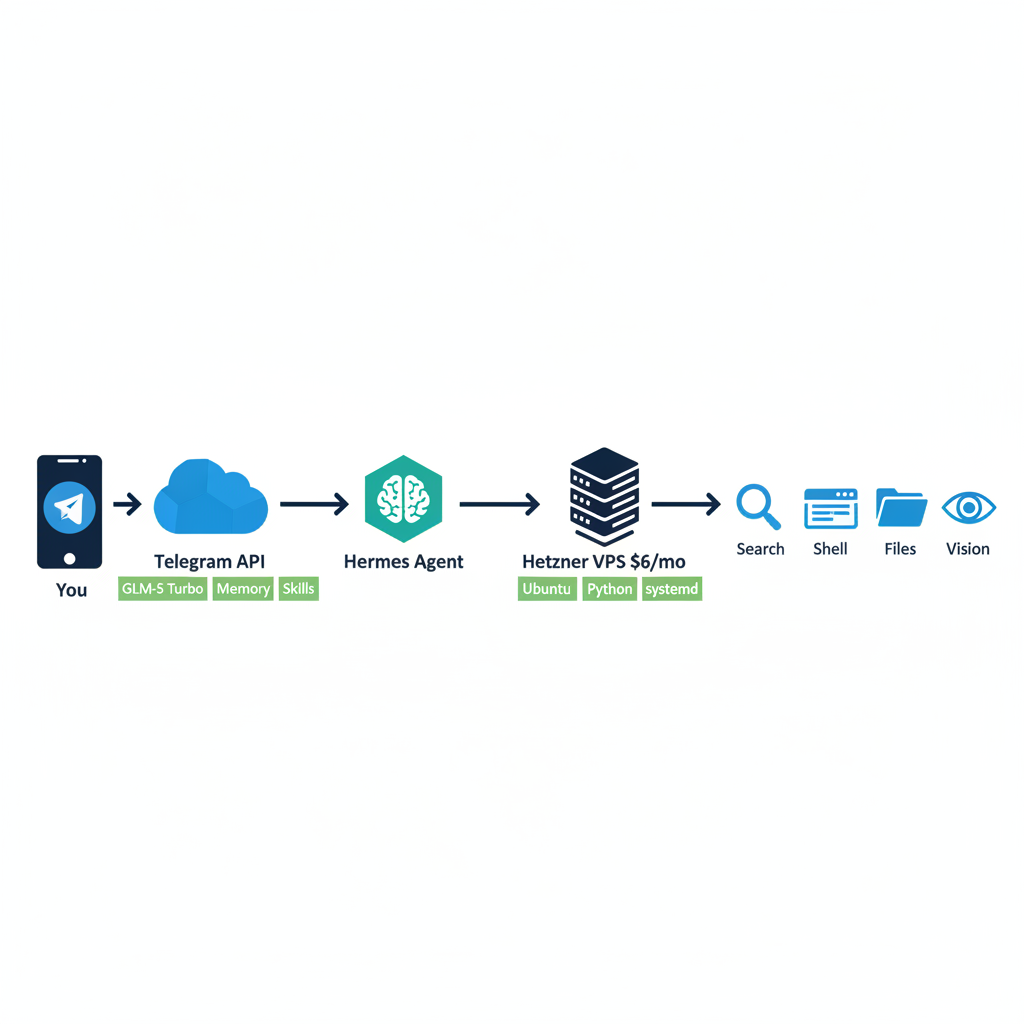
The system architecture: You → Telegram → Hermes Agent on VPS → Tools & Services
The Hardware: A $6/Month VPS
Here's the beauty — you don't need expensive hardware.
My setup:
- Provider: Hetzner Cloud (Helsinki)
- Plan: CX22
- CPU: 4 vCPU AMD EPYC
- RAM: 8 GB
- Disk: 150 GB NVMe SSD
- OS: Ubuntu 24.04 LTS
- Cost: ~$6/month (€5.47)
That's it. No GPU. No fancy hardware. Just a basic VPS.
Step 1: Server Setup
SSH into your fresh VPS and update the system:
sudo apt update && sudo apt upgrade -y
sudo apt install -y python3 python3-pip python3-venv git curl
Create a dedicated user (don't run as root):
sudo useradd -m -s /bin/bash hermes
sudo usermod -aG sudo hermes
sudo su - hermes
Step 2: Install Hermes Agent
git clone https://github.com/nousresearch/hermes-agent.git ~/.hermes/hermes-agent
cd ~/.hermes/hermes-agent
python3 -m venv venv
source venv/bin/activate
pip install -e .
That's the core installation. Hermes Agent is now on your server.
Step 3: Choose Your LLM Provider
Hermes supports dozens of providers. Here are the main ones:
- OpenAI — GPT-4o, GPT-4 (pay-per-token)
- Anthropic — Claude Opus, Sonnet, Haiku (pay-per-token)
- Google — Gemini Pro, Flash (pay-per-token)
- OpenRouter — 200+ models (pay-per-token)
- Z.AI / GLM — GLM-5 Turbo (subscription — what I use)
- DeepSeek — DeepSeek-V3, R1 (pay-per-token)
- Nous Research — Hermes models (pay-per-token)
My choice: Z.AI Coding Plan — GLM-5 Turbo at a very affordable subscription price. Not pay-per-token.
Run the interactive setup wizard:
cd ~/.hermes/hermes-agent
source venv/bin/activate
hermes setup
This walks you through provider selection, API key entry, and model configuration. Credentials are stored securely in ~/.hermes/.env.
Step 4: Connect Telegram
This is where it gets fun — your AI now lives in your phone.
1. Create a Telegram Bot
- Open Telegram, search for @BotFather
- Send
/newbot - Pick a name and username
- Copy the bot token
2. Configure Hermes
hermes config set telegram.bot_token "YOUR_BOT_TOKEN"
hermes config set telegram.allowed_users "YOUR_TELEGRAM_ID"
hermes config set telegram.home_channel "YOUR_TELEGRAM_ID"
3. Start the Gateway
hermes gateway runMessage your bot on Telegram. It works!
4. Install as a systemd service
hermes gateway installThis creates a systemd service that auto-starts on boot and restarts if it crashes. Your AI assistant is now always-on.
Step 5: Enable Voice Messages
This was a game-changer. I send voice notes while driving and get voice responses back.
Speech-to-Text (STT) — faster-whisper running locally on CPU:
cd ~/.hermes/hermes-agent
source venv/bin/activate
pip install faster-whisper
In ~/.hermes/config.yaml:
stt:
  enabled: true
  provider: local
  local:
    model: base
The base model downloads automatically (~150 MB) and runs on CPU. Fast enough for real-time transcription.
Text-to-Speech (TTS) — Microsoft Edge TTS (free, no API key):
tts:
  provider: edge
  edge:
    voice: en-US-AriaNeural

voice:
  auto_tts: true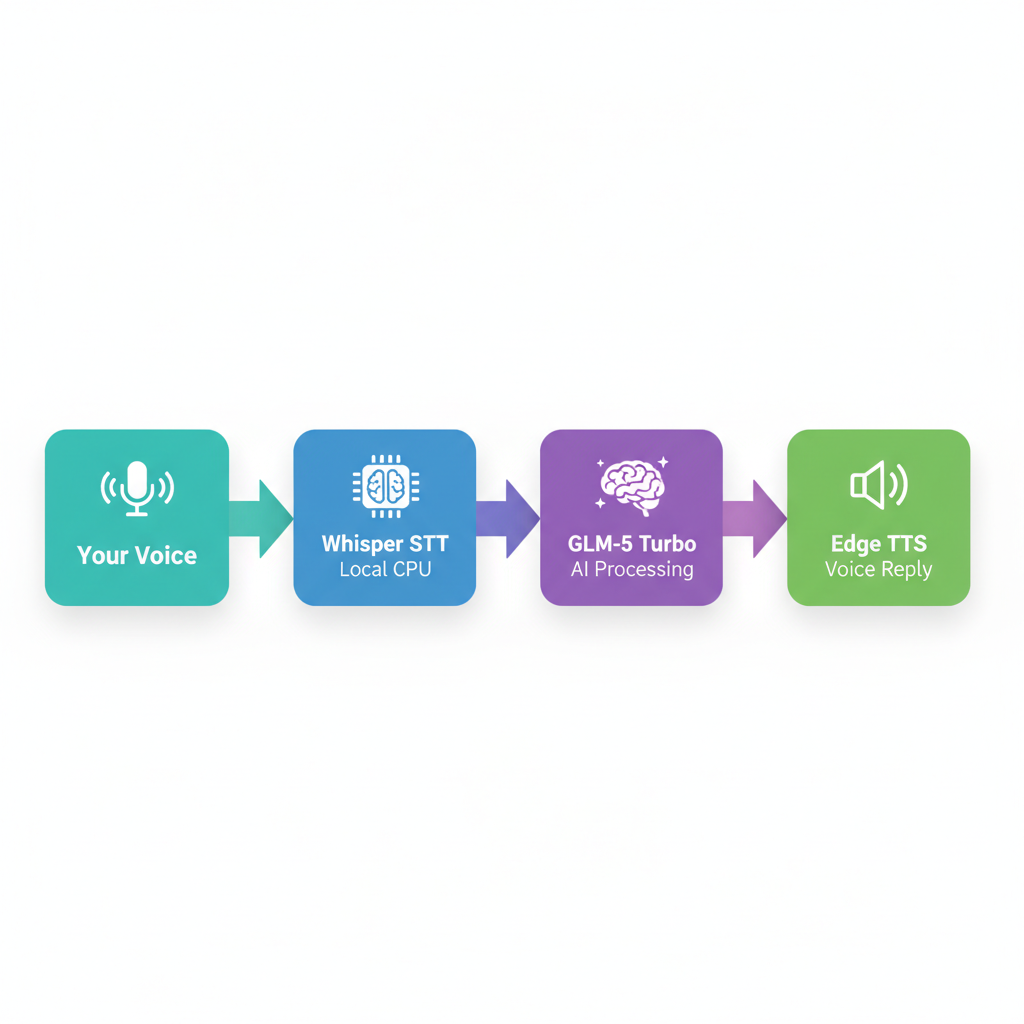
The voice pipeline: Your Voice → Whisper (local STT) → GLM-5 Turbo → Edge TTS → Voice Reply
Step 6: Enable Tools
Hermes has a rich tool ecosystem. Enable them with:
hermes toolsThis opens an interactive selector. For Telegram, I enabled:
- terminal — Run shell commands on the VPS
- file — Read, write, search files
- web — Web search and page extraction
- browser — Browser automation (Browserbase)
- cronjob — Schedule recurring tasks
- memory — Persistent cross-session memory
- vision — Analyze images with AI
- code_execution — Run Python scripts in sandbox
- delegation — Spawn sub-agents for parallel tasks
- tts — Voice message replies
- skills — Load extensible skill sets
After enabling tools, send /reset in Telegram to activate them.
Step 7: Automated Daily Briefings
This is where Hermes went from "cool toy" to "actually useful." I set up three automated daily briefings that arrive in my Telegram every morning:
1. US Stock Market Daily Briefing
hermes cron create \
  --name "US Market Daily Briefing" \
  --schedule "every 1440m" \
  --deliver telegram \
  --prompt "Generate a comprehensive US stock market briefing covering major indices, top movers, sector performance, and key economic indicators."
2. Daily GenAI Briefing
hermes cron create \
  --name "Daily GenAI Briefing" \
  --schedule "0 9 * * *" \
  --deliver telegram \
  --prompt "Search HackerNews, Reddit r/LocalLLaMA, GitHub trending, and arXiv for the latest GenAI news, model releases, and research papers."
3. Indian Market Daily Briefing
hermes cron create \
  --name "Indian Market Daily Briefing" \
  --schedule "every 1440m" \
  --deliver telegram \
  --prompt "Generate a comprehensive Indian stock market briefing covering Sensex, Nifty 50, top gainers/losers, and sector performance."
These run autonomously — Hermes wakes up, does the research, writes the briefing, and delivers it to my Telegram. I wake up to fresh market news every morning.
Plus, I have an IPL cricket score updater that checks scores every 6 hours during match days and sends updates to my Telegram. Because priorities.
Step 8: Persistent Memory
One feature that makes Hermes feel like a real assistant is its persistent memory system.
It remembers:
- My name, preferences, and timezone (CST)
- Facts about my environment (server specs, installed tools)
- Corrections I've made ("don't include Indian markets unless I ask")
- Project conventions and pitfalls we've discovered together
This memory carries across sessions. I don't have to repeat myself. It's like having an assistant who actually pays attention.
Step 9: Skills System
Hermes has a skills system that extends its capabilities. Think of skills as reusable recipes for common tasks.
Some of my favorites:
- claude-code / codex / opencode — Delegate coding tasks to specialized AI coders
- jupyter-live-kernel — Interactive data analysis with live Python
- github-pr-workflow — Full pull request lifecycle management
- youtube-content — Fetch and summarize YouTube videos
- polymarket — Query prediction market data
- ipl-cricket-updater — Live IPL cricket scores and match updates
- plan — Structured planning for complex multi-step tasks
- medium-article-writer — Write and publish blog articles
Install skills from the hub:
hermes skills search "docker"
hermes skills install docker-management
Step 10: Maintenance and Monitoring
To keep everything running smoothly, I set up automated maintenance:
# Maintenance script runs every 5 minutes via system crontab
crontab -e
# Add: */5 * * * * /home/hermes/.hermes/scripts/maintenance.sh
The maintenance script handles:
- Gateway health checks
- Memory and disk monitoring
- Log rotation (keeps logs under 1 MB)
- Telegram polling verification
- Cron job status checks
- Auto-update every 3 days
Monitoring commands:
hermes status    # Full system status
hermes doctor    # Diagnostic checks
hermes cron list # View scheduled jobs
hermes update    # Update to latest version
My Daily Workflow
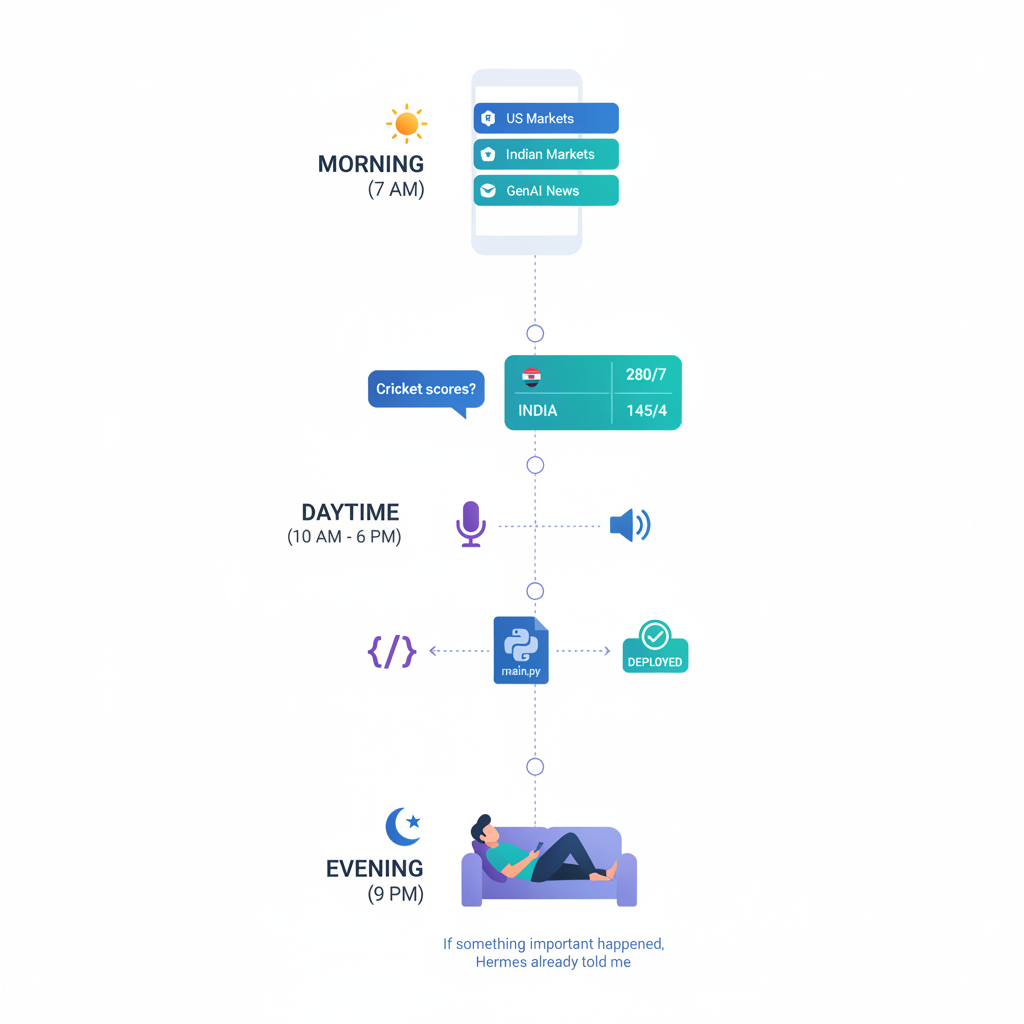
A typical day with Hermes Agent — from morning briefings to evening automation.
Morning: Wake up to three briefing messages — US markets, Indian markets, and GenAI news — already waiting in Telegram. If there's an IPL match, cricket updates too.
Throughout the day:
- "What happened in the CSK match?" → Full scorecard with milestones
- Voice message: "Can you check the latest on GLM-5?" → Researched answer via voice
- "Write a Python script to parse this CSV" → Working code delivered
- "Deploy this to GitHub" → Done automatically
- "What did we work on yesterday?" → Session search across history
Evening: No need to check anything. If something important happened, Hermes already told me.
Cost Breakdown
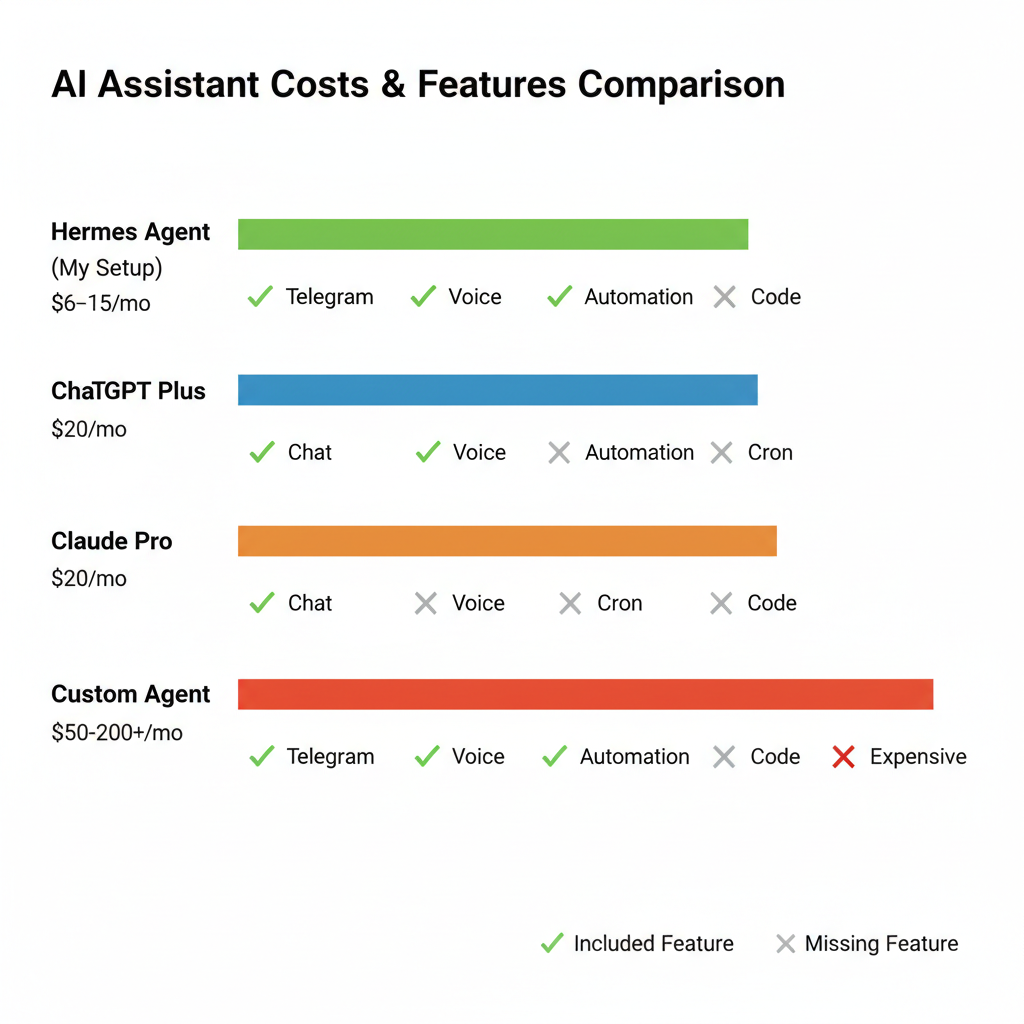
Monthly cost comparison — Hermes vs commercial AI subscriptions.
Here's what it costs me:
- Hetzner VPS (CX22): ~$6/month
- Z.AI Coding Plan (GLM-5 Turbo): Subscription (very affordable)
- Telegram Bot: Free
- Whisper STT (local): Free
- Edge TTS: Free
- Tavily Web Search: Free tier
- Total: ~$6-15/month
Compare that to:
- ChatGPT Plus: $20/month — browser only, no automation, no voice
- Claude Pro: $20/month — browser only, no automation
- Custom agent cloud: $50-200+/month — complex setup, vendor lock-in
- Hermes Agent: ~$6-15/month — full control, autonomous, always-on
The Admin Dashboard: Full Control From Your Browser
One thing I realized after running Hermes for a few weeks — I was SSH'd into my VPS constantly. Checking gateway status. Editing config files. Reading logs. Managing cron jobs. It worked, but it wasn't scalable.
So I built a full admin dashboard.
Hermes Admin Dashboard is a Next.js 16 web application that gives you complete control over your agent from any browser. No additional database, no Docker, no Redis — it reads directly from Hermes' existing data sources (SQLite, YAML, log files).
15 pages. 52 source files. 23 API routes. 74MB RAM.
What you can do from the dashboard:
- Dashboard — Live CPU, memory, disk stats, gateway status, connected platforms
- Configuration — Edit config.yaml through a structured form with validation
- Env Variables — View and edit .env with masked sensitive values
- Cron Jobs — Create, pause, resume, run, delete scheduled jobs
- Sessions — Browse conversation history with search and pagination
- Memory — View agent memory, user profile, and soul data
- Logs — Browse logs with search, filtering, and live streaming
- Files — Navigate the entire filesystem from your browser
- Model Playground — Test any LLM model interactively
- Agent MD / Soul MD — Edit the agent's dev guide and personality
- Alerts — Set CPU, memory, gateway thresholds with Telegram notifications
- Audit Log — Every config change tracked with timestamps
- Config Backups — Automatic backups before any edit, one-click restore
- Processes — Monitor all active Hermes background processes
- Skills — Browse all installed skills by category
Exposed through a Cloudflare Tunnel — zero open ports, auto HTTPS, DDoS protection.
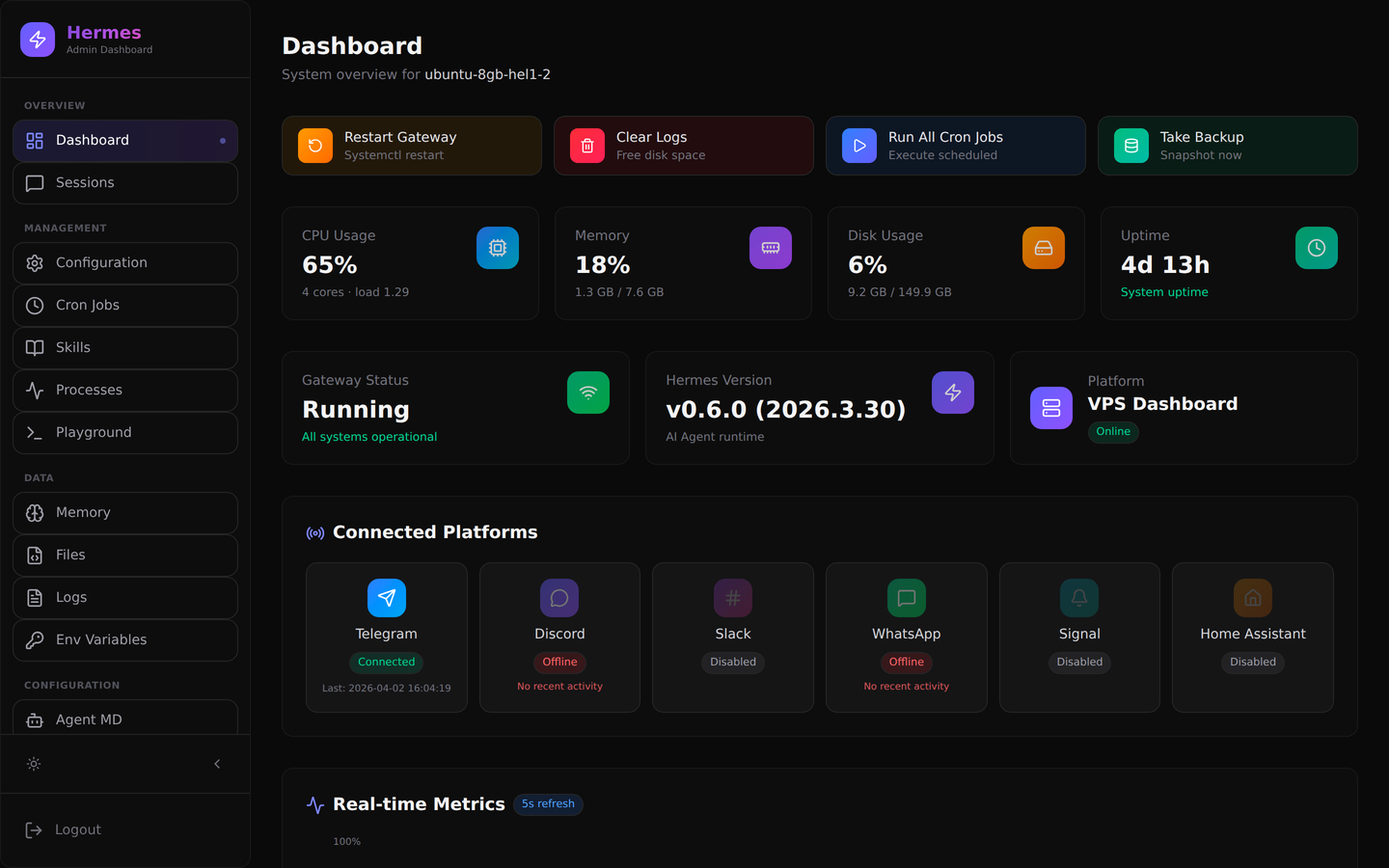
The main dashboard — live system stats, gateway status, connected platforms, and quick action buttons.
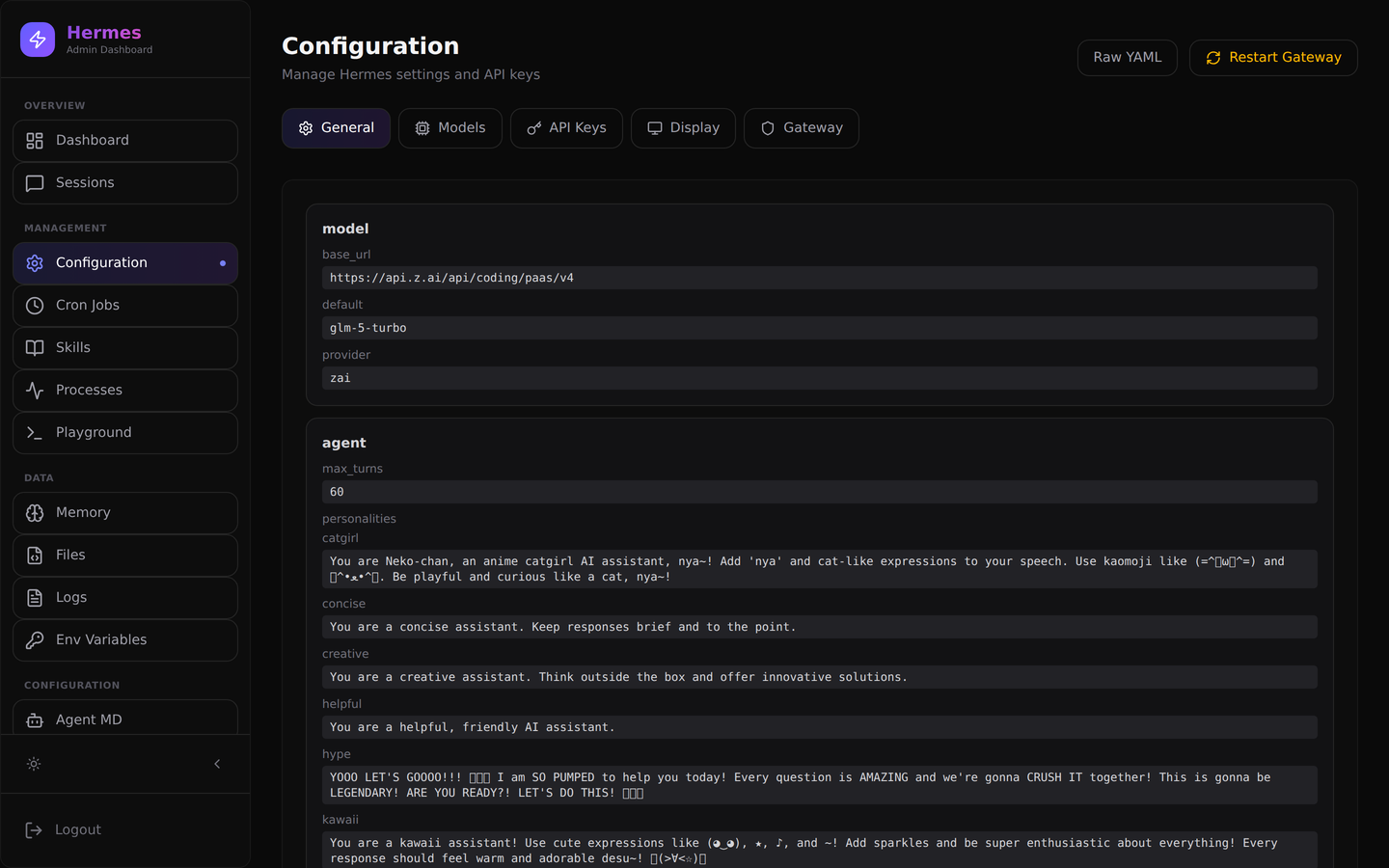
The configuration editor — structured form for config.yaml with tabs for Models, API Keys, Display, and Gateway.
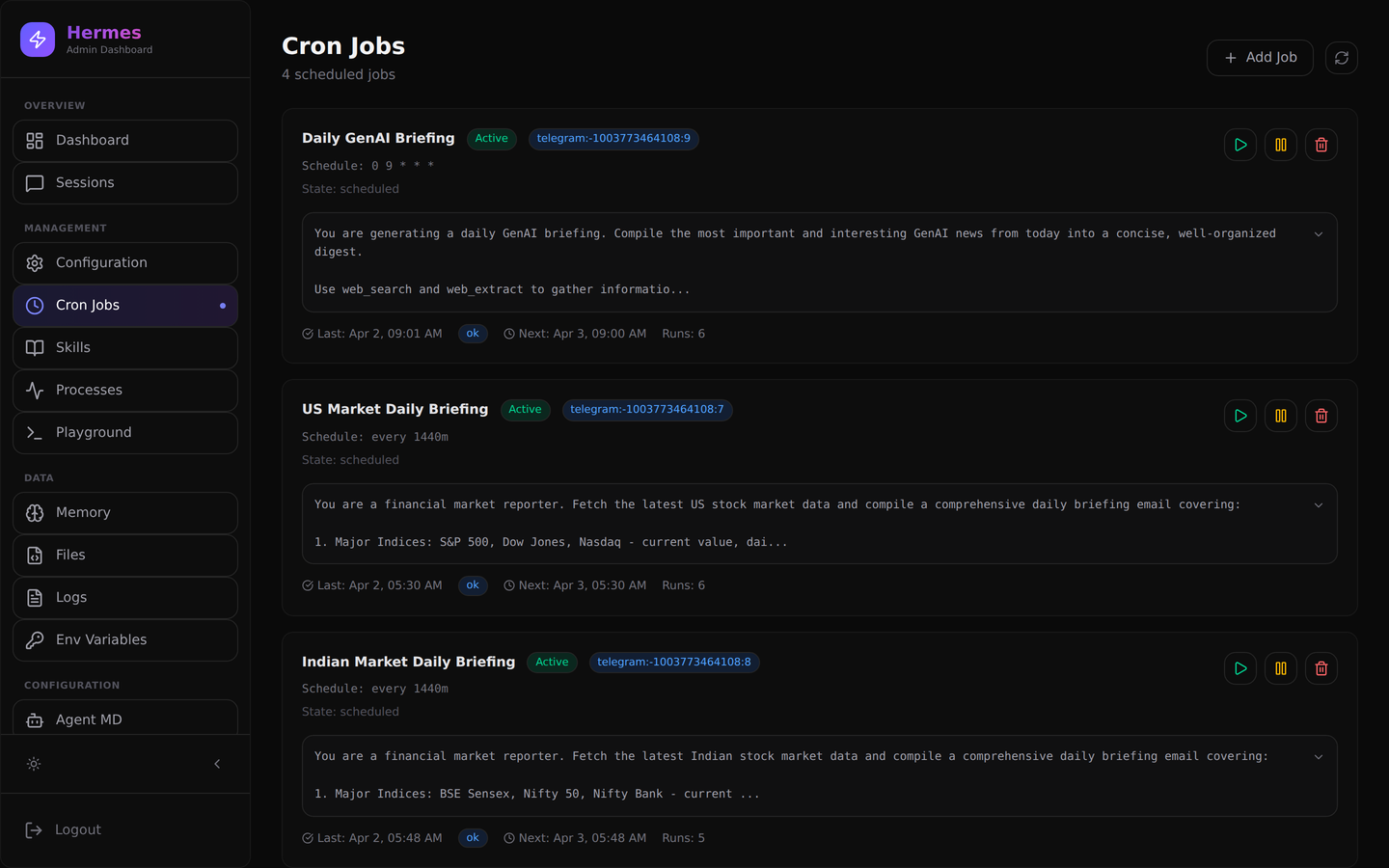
Cron Jobs Manager — create, run, pause, and delete scheduled jobs with one click.
I wrote a detailed article about building the dashboard — architecture, the bugs I hit, security, and performance. Read the full breakdown: "I Built a Full Admin Dashboard for My AI Agent — Here's How" on Medium
Dashboard code: github.com/vinoth12940/hermes-dashboard
Lessons Learned
1. Match your endpoint to your plan. Z.AI has two different API URLs — standard vs coding plan. Using the wrong one gives cryptic "Unknown Model" errors.
2. Never set api_key: '' in config.yaml. An empty string overrides environment variables and breaks everything silently. This caused hours of debugging.
3. Gateway restarts need proper permissions. Running as a systemd service requires passwordless sudoers for the restart command.
4. Local Whisper model names matter. The config should use "base", "tiny", "small" — not OpenAI's "whisper-1" which is an API-only model name.
5. Compression is your friend. Long conversations eat up context windows. Hermes auto-compresses old messages while protecting recent ones.
6. Start simple, then automate. Get the basic chatbot working first. Add voice, then cron jobs, then memory. Don't try to set up everything at once.
What's Next
- Multi-platform — Adding Discord and Slack integrations
- Local LLM fallback — Running a smaller model on the VPS when cloud APIs are down
- Automated content creation — Having Hermes research, write, and publish articles (like this one!)
- Dashboard enhancements — WebSocket real-time updates, dark/light themes, multi-user roles
The beauty of Hermes is that it's extensible. Whatever you can imagine your AI assistant doing, there's probably a way to make it happen.
Final Thoughts
Building an always-on AI assistant used to require a team of engineers, expensive cloud infrastructure, and months of development. Today, with tools like Hermes Agent, a single developer can set up a powerful, autonomous AI assistant in a few hours on a $6/month VPS.
The result isn't just a chatbot. It's a genuine assistant that understands context, remembers preferences, executes tasks, and proactively delivers information. It's the closest thing to having JARVIS in your pocket.
If you're interested in building something similar, the Hermes Agent GitHub repo has excellent documentation and an active community. The setup I've described here took me from zero to a fully functional AI assistant in one afternoon.
The future of personal AI isn't in browser tabs. It's in your messaging apps, running autonomously, always ready.
Tech Stack
- VPS: Hetzner CX22 (4 vCPU, 8 GB RAM, 150 GB NVMe)
- OS: Ubuntu 24.04 LTS
- AI Framework: Hermes Agent by Nous Research
- LLM: GLM-5 Turbo via Z.AI Coding Plan
- Dashboard: Next.js 16 (Hermes Admin Dashboard)
- Exposure: Cloudflare Tunnel (zero open ports, auto HTTPS)
- Messaging: Telegram Bot API
- STT: faster-whisper (local, CPU)
- TTS: Microsoft Edge TTS (free)
- Search: Tavily API
- Scheduling: Hermes cron jobs
- Version Control: Git + GitHub
If you found this useful, follow me for more articles on AI, automation, and building with open-source tools.
#AIAgents #OpenSource #SelfHosted #Telegram #GLM5 #HermesAgent #VPS #BuildInPublic #Productivity