How I Added Reasoning Memory to My AI Agent Using Honcho — and Why You Should Too
A complete guide to giving your AI agent long-term memory that actually reasons about your conversations — for under $0.03/day.
I run a personal AI agent 24/7 on a VPS. It sends me market briefings, tracks cricket scores, writes articles, manages my server, and handles code tasks — all through Telegram.
But there was a problem: it kept forgetting things.
Not just old conversations. It would forget my preferences, my timezone, the structure of my projects, even what we were working on yesterday. I'd have to repeat context every session. The built-in memory system — a simple text file injected into the system prompt — had a 4,400 character limit. That's roughly 15 facts before it starts overwriting the oldest ones.
After months of frustration, I integrated Honcho — a cloud-based memory service that doesn't just store facts, but reasons about them. It now indexes every conversation, extracts conclusions automatically, and injects relevant context into each new turn.
Here's how I set it up, what it cost, and what I learned.
The Problem with Built-in Agent Memory
Most AI agents — whether it's Claude Code, Codex, or a custom setup like mine — ship with some form of persistent memory. Usually it's a markdown file that gets read and injected into the system prompt.
This approach works for a while, but it has fundamental limitations:
- Size ceiling: 4,400 characters sounds like a lot until you try to fit your timezone, security preferences, project structure, coding style, tool configurations, and recurring tasks into it
- No semantic search: It's a flat text file. The agent can't "find related things" — it only sees the exact text
- Manual curation: You (or the agent) must constantly decide what to keep and what to delete
- No reasoning: The memory doesn't understand you. It stores facts, not insights
There's also a session search feature — it can look through past conversation transcripts. But this is expensive (uses token context), slow, and doesn't surface cross-session patterns.
I needed something that could remember everything, find relevant things, and learn from patterns.
Enter Honcho: Memory That Reasons
Honcho is an open-source memory library with a managed cloud service, built by Plastic Labs. Their tagline is "Memory That Reasons," and after using it in production for several months, I can confirm that's exactly what it does.
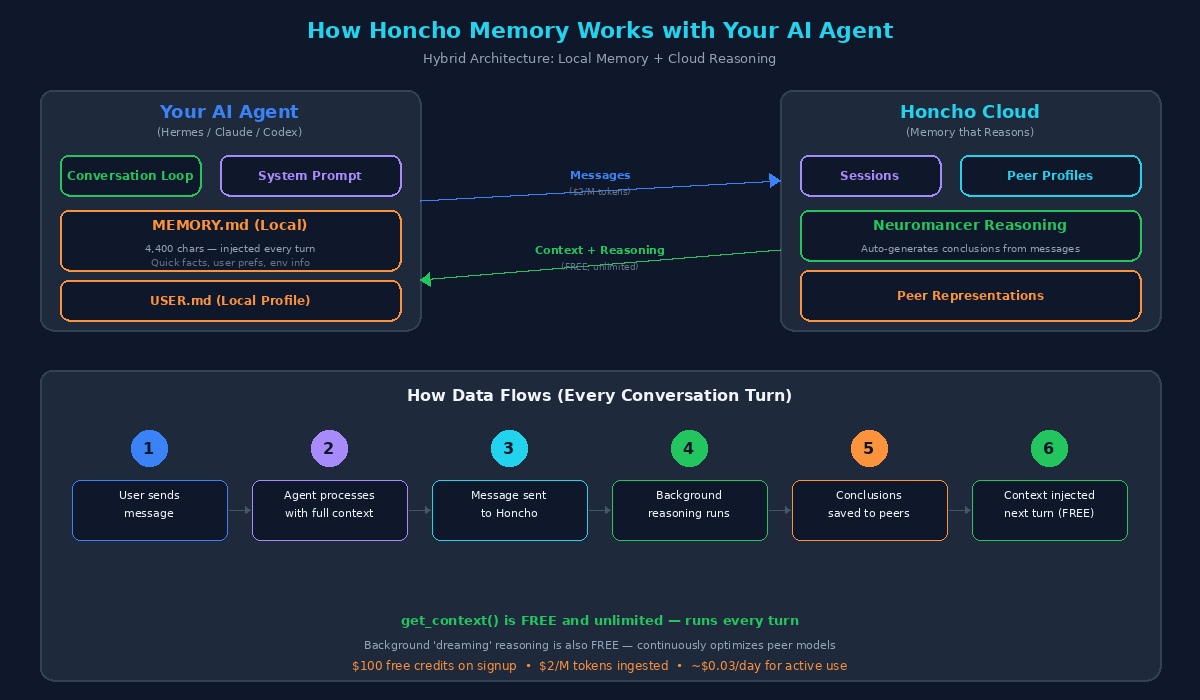
Architecture: How your AI agent connects to Honcho's reasoning memory layer
Here's the core idea: every message you send to your agent gets forwarded to Honcho. In the background, Honcho's reasoning engine (called Neuromancer) processes these messages and generates conclusions — insights about you, your preferences, your patterns, and your work.
These conclusions are stored as peer representations — dynamic profiles that evolve over time. When your agent starts a new conversation, it queries Honcho for relevant context using get_context(), which is free and unlimited.
The result? Your agent starts each conversation already knowing who you are, what you're working on, and what matters to you — without you having to repeat anything.
Key Concepts
- Sessions: Each conversation maps to a session in Honcho. Messages are stored per-session
- Peers: There's a peer for you (the user) and a peer for the agent. Honcho builds separate models for each
- Conclusions: Auto-generated insights like "User prefers concise responses" or "User's primary codebase is a Next.js dashboard"
- Representations: The full profile built from all conclusions — this is what makes the memory "reason"
- Dreaming: Background reasoning that continuously optimizes peer models without impacting performance
Why I Chose Honcho Over Alternatives
I evaluated several memory solutions before settling on Honcho. Here's what I found:
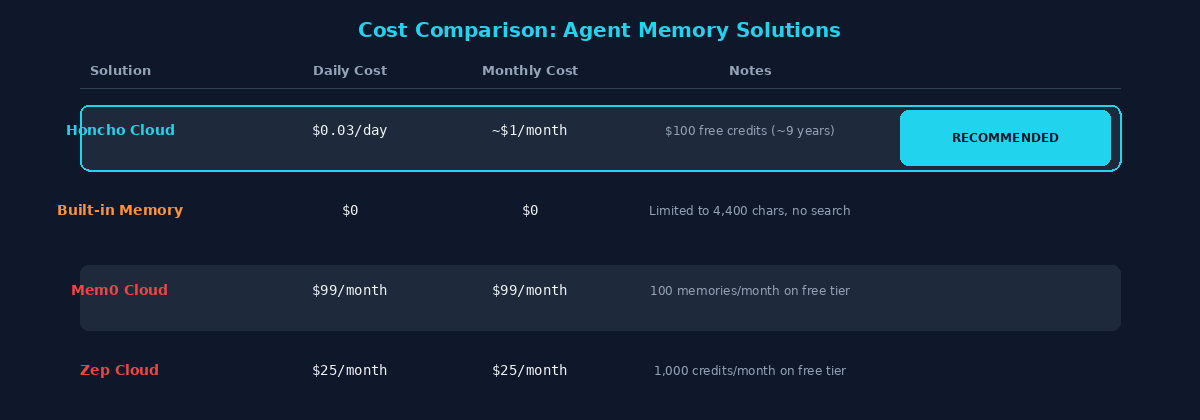
Cost comparison of popular agent memory solutions
- Honcho Cloud: $2/M tokens ingested. The
get_context()call that runs every turn is completely free. Background dreaming is also free. At my usage level (~40 sessions/day), this costs roughly $0.03/day — about $1/month - Built-in memory: Free, but limited to 4,400 characters. No search, no reasoning. Fine for basic needs
- Mem0: $99/month for the developer plan. The free tier gives you 100 memories per month, which is barely usable
- Zep: $25/month for the Flex plan. Has interesting temporal awareness (knows when facts were true), but expensive for personal use
The deciding factor: Honcho gives you $100 in free credits on signup. At my usage rate, that's roughly 9 years of free memory. And the only thing you pay for is ingestion — retrieval is completely free.
The Setup: 3 Steps, 5 Minutes
Here's how I set up Honcho with my agent. The process is straightforward, but there are a few pitfalls I'll cover.
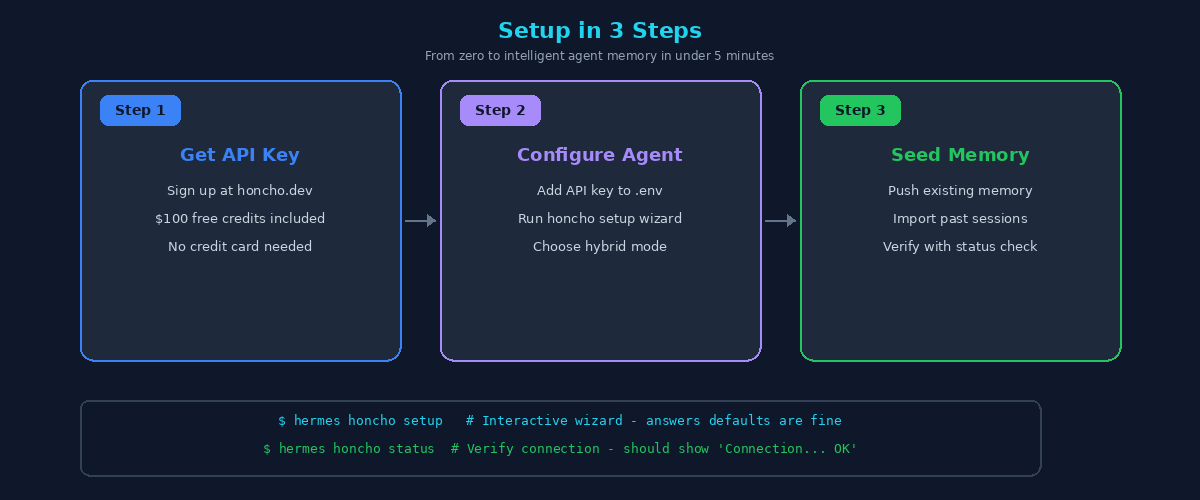
Setup overview — get API key, configure agent, verify
Step 1: Get Your API Key
Head to honcho.dev and create an account. You'll get an API key immediately, and $100 in free credits will be applied automatically. No credit card required.
Once you have your key, add it to your environment:
# Add to your agent's .env file
HONCHO_API_KEY=hch-v3-your-key-here
Step 2: Run the Setup Wizard
If your agent has a Honcho integration (mine does through Hermes), there's usually a setup command:
$ hermes honcho setupThis interactive wizard asks you a few questions:
- Workspace name: A logical grouping for your agent's memory (I used "hermes")
- User peer name: Your identifier (used for the user model)
- AI peer name: The agent's identifier (used for the agent model)
- Memory mode: Choose "hybrid" — this keeps your local memory file AND adds Honcho on top
- Write frequency: Choose "async" — messages are sent to Honcho in the background, no blocking
- Recall mode: Choose "hybrid" — combines local memory with Honcho context
Pitfall — duplicate .env entries: The setup wizard may write an empty
HONCHO_API_KEY=line to your .env file before your real key. Since most tools read the first match, your agent will get an empty key and fail with "Invalid API key." Always check for duplicates after running setup:
# Check for duplicate entries
grep -n "HONCHO_API_KEY" ~/.hermes/.env

# If you see an empty one, remove it
sed -i 'Nd' ~/.hermes/.env  # Replace N with the line number
Step 3: Verify and Seed
After setup, verify the connection:
$ hermes honcho status

Honcho status
──────────────────────────────────
  Enabled:        True
  API key:        ...xxxxx
  Workspace:      hermes
  User peer:      your-username
  AI peer:        your-agent-name
  Session key:    hermes-agent
  Recall mode:    hybrid
  Memory mode:    hybrid
  Write freq:     async

  Connection... OK
Next, seed your existing memory into Honcho so it starts with context. I pushed my agent's identity file (SOUL.md) and existing memory files:
# Seed the agent's identity
hermes honcho identity ~/.hermes/SOUL.md

# Verify it worked
hermes honcho identity --show
If you have existing conversation history, you can push those sessions too. I wrote a script that imported 274 past sessions — the bulk ingestion cost about $16 of free credits, leaving ~$84 for ongoing use (still ~7+ years at current rates).
How It Works in Practice
After running Honcho for several months, here's what the actual experience looks like.
Automatic Context Injection
Every time I start a new conversation, the agent automatically queries Honcho for context. This means the agent already knows:
- My timezone and scheduling preferences
- My coding style and project conventions
- What we worked on in previous sessions
- My communication preferences (concise, no fluff)
- Security-conscious behavior patterns
I don't have to provide any of this upfront. The agent just... knows.
Intelligent Recall
When I say something like "where were we?" or "what did we fix last time?", the agent uses Honcho's semantic search to find relevant past conversations and synthesize the answer. This works across hundreds of sessions — something that would be impossibly expensive with raw context search.
Ongoing Learning
The most impressive part: Honcho's background reasoning (dreaming) continuously extracts new conclusions from conversations. I don't have to explicitly "save" memories. Every interaction potentially improves the agent's understanding of me.
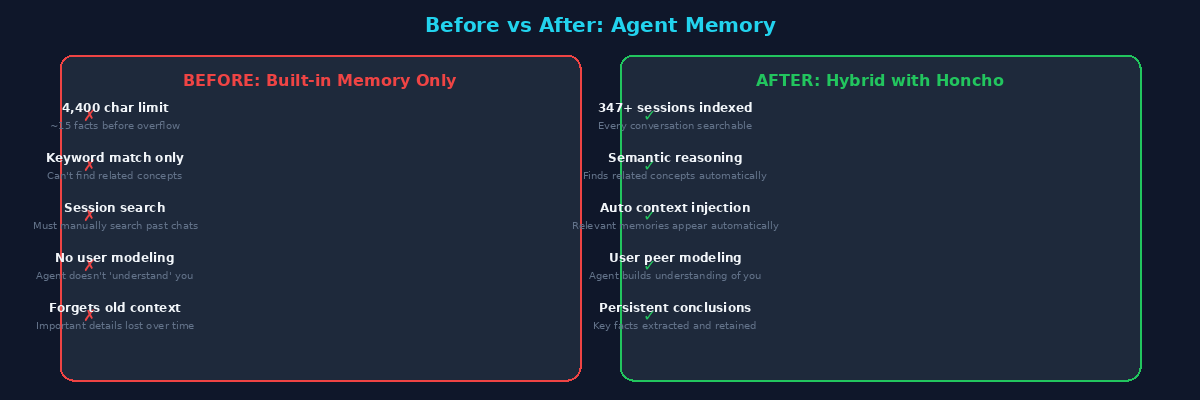
Before vs After: the difference Honcho makes in daily agent interactions
The Hybrid Approach: Why I Keep Both
I didn't replace my built-in memory — I layered Honcho on top of it. Here's why the "hybrid" mode matters:
- Local memory is instant: It's a text file. No API calls, no latency. Critical for high-frequency facts like timezone, active model, and server paths
- Honcho is for depth: It handles the things that don't fit in 4,400 characters — conversation history, user modeling, cross-session patterns, semantic recall
- Redundancy: If Honcho is down, the agent still has its local memory. If the local memory gets corrupted, Honcho has the full history
Recommendation: Always start with "hybrid" mode. You can switch to "honcho-only" later if you want, but there's no going back without losing local memory writes. Hybrid gives you the best of both worlds.
Cost Breakdown: Real Numbers
After several months of production use, here are my actual numbers:
- Sessions indexed: 347+ conversations
- Conclusions extracted: 87+ automated insights about my preferences and patterns
- Daily cost: ~$0.03 (roughly 15,000 tokens ingested per day across ~40 sessions)
- Monthly cost: ~$0.92
- Free credits remaining: $84 after bulk session import
- Estimated runway: ~7+ years at current usage
For context, the get_context() call that runs on every single conversation turn costs absolutely nothing. You only pay for ingestion ($2/M tokens). Background dreaming is also free.
The key insight: The expensive part of memory is never the storage or retrieval — it's the reasoning. Honcho bundles reasoning into the ingestion cost, making it dramatically cheaper than running your own reasoning pipeline.
Lessons Learned
Here are the things I wish I knew before setting up Honcho:
1. Watch Out for .env Duplication
Already covered above, but it's worth repeating because it bit me twice. The setup wizard can write stale entries. Always grep your .env file after setup.
2. Peer IDs Must Match Everywhere
If you manually create peers or push sessions with a script, make sure the peer IDs match what the gateway uses. Mismatched peer IDs means the gateway connects successfully but honcho_profile returns empty — all your data is invisible. Check your honcho.json configuration.
3. Session Names Don't Need to Match
Imported sessions get different names than live gateway sessions (e.g., "imported-abc123" vs "telegram-1234567890"). This is fine — Honcho's semantic search works across all sessions in a workspace regardless of naming.
4. Bulk Import is Worth It
Importing past sessions costs tokens (~$16 for 274 sessions), but it means Honcho has context from day one. Without seeding, it takes weeks of conversations for the memory to become truly useful.
5. Monitor Your Dashboard
If your agent has a dashboard, check it periodically. The Honcho page should show a growing conclusion count and active status. If conclusions stop growing, something's wrong with the ingestion pipeline.
What's Next
Honcho 3.0 introduced significant improvements to the reasoning pipeline, and the team is actively developing features like enhanced dreaming (where background reasoning becomes even more powerful) and improved temporal awareness.
For my setup, the next step is pushing the remaining session history and fine-tuning what conclusions get extracted. But even at the current state, the difference in agent quality is night and day.
If you're running any kind of persistent AI agent — whether it's Claude Code, a custom bot, or a full assistant like mine — Honcho is worth the 5-minute setup. The free credits make it risk-free, and the improvement in agent memory is immediate.
Useful Links
- Honcho Official Site — Sign up and get your API key
- Honcho Documentation — Architecture, quickstart, API reference
- Honcho GitHub — Open-source memory library
- Honcho Python SDK — Python integration
- Announcing Honcho 3.0 — Reasoning, dreaming, and pricing changes
Thanks for reading. If you found this useful, consider following for more articles on self-hosted AI infrastructure and agent development.